Posts

Expressions in JSE!

Image
A milestone in creating expressions in my own maya script editor, along with previous features of splitting and deleting panes. Oh yeah and it will transfer your current scripting tabs over to the script editor. In other news on coding this, I've been looking into the logging library and creating debug messages using those, which I found pretty funky as I can turn them on or off by setting the severity limit.

Major Project Environment Modelling

Image
Almost forgot about the blog, my bad. Lately in our Major project, one of the areas I have been contributing to is the modelling of our environment asset, notably establishing the scale with proxy geometry which are all done in Maya. Scene environment work in progress The general proxy geometries of the steps, floors, doors, windows, etc. were quickly modelled. Then came the railing and the lamp-pillar at the start and end of every flight. Quick concept art of the railings and lamp-pillar that I work from, provided by our concept artist Paris Jones The pillars were first approached, modelled and UV'd. To offer the director a choice, I modelled the pillar in both of rectangular or cylindrical profiles of each individual pillar element so we can mix and match to formulate the final geometry. Using Maya 2015's UV tools felt a little better than previous versions e.g. able select UV shells in the UV texture like you would with faces, edges, etc was nice. Howeve...

Pipeline preparations with Shotgun

Image
I've been looking more into Shotgun software for our production recently, setting up assets, task templates, shots and experimenting with other customisation features for pages to get a feel for the software more. From what I experienced so far, this is a very flexible system, very customisable hence some other people have no clue on how to set things up. Created a task template for helping quickly populating production assets list It is centred around assets, which can only be created by the manager account, which can have various files and attributes assigned to it and from that, it can be linked to other production elements such as shots, schedules and the review system within Shotgun. Populating assets and shots in Shotgun, yet to associate them with each other Currently, both the artist and manager accounts cannot setup Shotgun Desktop app meaning at the moment, Shotgun used more in a sense as a web-app rather than a full integrated system for production....

Shotgun! Feast! And small things

Image
Lately for major project, I have started looking into the Shotgun using the accounts given to start looking at pipeline. The artist permissions pre-set had very limited control, obviously, but I was kindly given access to a managers permissions account which I did some test setting up assets, shots, assigning schedules and customising pages. More work is still to be done with experimenting and planning our pipeline as well as starting to layout the various pieces of our project into Shotgun. In the mean time, I emailed Greg Culp, the lead lighting artist for the short film 'Feast', for some advice on flat looks for lighting and rendering. To my delight, he managed to reply and give valuable help for us which we will surely be looking into during look dev.

More nParticle Butterfly Tests

Image
Just quick adjustments the the force fields (turning down turbulence and keying various field's magnitudes) and changes to the custom aim expression/script. Still not convinced on the general behaviour of the butterflies, I think I will write my own flocking system to deal with them. At the current state, they are most useful for long shots and when the butterflies may need to collide with objects due to the use of nParticles. I think creating a custom flocking system will be to mainly provide a more realistic flight behaviour, with less sharp changes of direction which is an artifact of the current solution and also to allow for butterflies to follow and go to certain positions defined by the user. At the current moment I am unsure of how to do such things with nParticles and expressions.

Quick Render tests

Image
Did some really quick render test today with Mental Ray and Maya's ramp shader, definitely an improvement in terms of hardness of the edges over V-Ray. Soft edges can also be created too.

Joe's script editor, initial look and dev

Image
Continuation of pursuit for a more powerful and functional script editor from the university specialist project last year, I present the first look at JSE, or Joe's Script Editor. Yeah the name was definitely super cool, yeah. I have a lot of features lined up, including ideas from improving the script editor specialist project in the 2nd university year of study, including: Split panes (initial proof of concept complete) Opening and saving script behaviour just like in a normal text editor Re-written code execution procedures to overload the default one Vim style command line to do things New right click menus Integration with the existing scrip editor's preferences Some cool help to go with using it This is a personal project at the moment but I may consider it for the innovations project during this final university year. When I complete it to a good enough of a standard, I am thinking of proposing this to Autodesk as a candidate for replacing their existing ...

Early Butterfly flock using nParticles and instancing

Image
Been trying to simulate a flock/crowd of butterflies using Maya nParticles and instancing a simple animated geometry. So far I had to add a better butterfly pointing vector as the default set is limited, butterflies do not pitch or dive steeply which the most usable default option available, aim by velocity, does. I had to write a custom expression to get the butterfly to get them to fly flatter. Wasn't too pleased with the result at the moment, looks like a mess, especially the flapping which does not relate to the speed or change of direction of the butterflies. Also, as expected, they behave like a bunch of particles, which is random enough for shots such as when they are collecting underneath the umbrella, obviously needs more tweaking for that.

Vray Non-Photorealistic shading Splur

Image
Been rendering the Maya ramp shader using Vray for the lighting and rendering test for major project animation. May be considering using other renderers as so far I feel Vray is not really designed for non-photorealistic rendering.e.g. the edge cut off is still softer than I wanted it to be. I tried to imitate this render setup but in Maya but have been unsuccessful so far, the VRay materials does not seem to map the colours correctly on the lightMtl or the geometry shadow color and fall off does not get affected at all by the ramp shader. One of the first tests piping outColor of ramp to VRay materials I may investigate further into geometry shadow falloff in VRay shaders later on but we'll see how others go.

MasUp, 1: The essay

Image
Over Christmas holidays, I've written an essay looking at the arguments around whether nowadays films that utilising digital visual effects have a goal to wow the audience through amazing images, the spectacle, or try to tell a story, a successful narrative. Though at first thought, it seems like most are, blowing the audiences eyeballs into a fantasy dimension where anything is possible. However I also tried to argue against that, discussing how the effects and spectacular images still served the narrative or the film, to have an emotional impact that drives the film through the many phases of the story it is trying to tell. One could argue that the stories are bollocks nowadays and lack depth and strength, an argument also presented in my essay. To that, I do kind of agree, for example in Pacific Rim, I argued that the director did not intend on telling a magnificent story, but rather try to convey and highlight other values e.g. the bonds between father and son, humanity wo...

MasUp: Massive Updates

Haven't blogged my work in a long time due to assignment work and procrastination. Now that I have finally got around to it, the next few posts will be of the things that happened between the previous post and this one. I'll try keep it in chronological order, but no promises, here we go...

Added stress

Image
Updated the progress checker with a bar chart showing how much we have to do/total progress. Basically a count of all statuses for all assets: Green = Approved Yellow = Work in progress (not approved or unstarted) Red = Unstarted

New Progress checker for the team!

Image
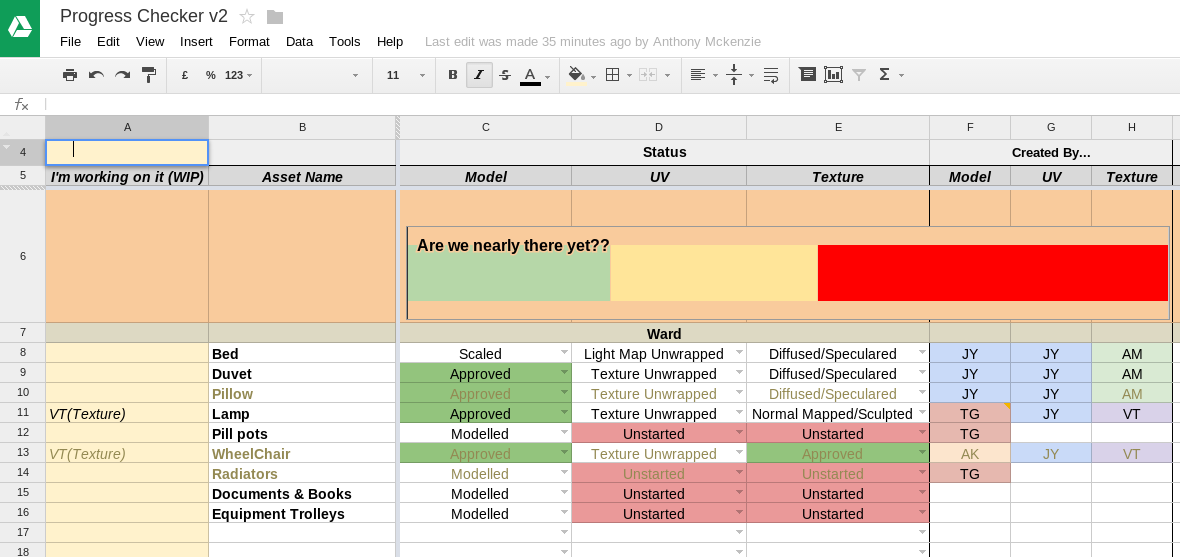
Previously I created a online spreadsheet to mark and manage progress we are making with the assets in our group project. It was done in the online excel app, simple but was lacking a few things. Meet the Progress Checker V2, done in Google Spreadsheet App which additionally allowed editing of: Comments, collaboration between team members. Wasn't able to do so in the online excel app although supported (WATDSITOEAAS) Freeze panes, viewing the headers of the table while whizzing around the vast list of assets, again WATDSITOEAAS Also added extra sections for marking who's done and doing what so we don't unnecessarily duplicate on work. A manual is also made so people are aware of the new changes. All this was done in 1 night.

Notes on modelling and texturing for games

The number of vertices in a model NOT to be more that the number of screen pixels that the model will ever be viewed at The resolution of the texture follows about the same lines (NOT to be more that the number of screen pixels that the model will ever be viewed at) Only found out during group project meeting with our supervisor. Lots of models have been done before that, but lots will be done since.

Tidying up and UV unwrapping

Time to tidy up more models done by others then UV unwrap them, add collision box and scale it according to our scene. Spotted a couple of invisible/needless faces along the way, deleting them so UV unwrapping and texturing will go more smoothly. Going to try do as little modification as possible so I can do as much as I can in the limited time left.

More scripts! Move and rotate camera to face a face

Image
It's an impaled camera!! Sometimes when I UV, I really wished there is an option to move the camera so it is perpendicularly pointing at the face I'm unwrapping, while centred at the face's centre. This will help when UV planar project from the axis does not yield and fiddling around trying to get the camera perfect sucks. Unfortunately there don't seem to be there by default, so after a day of planning and scripting, here it is! Have to revert to A Level maths mechanics about the centre of mass of a lamina and a spreadsheet to plan and check the values before I started scripting, but it's done! All you have to do is: Select a face Edit 1 word of the script to the name of the camera you want to move Run the whole script Few flaws though: You will have to dolly out to view the face  The viewFit command (hotkey f) sometimes messes up the face centring I haven't got around to implementing something that translates the camera's loca...

Lightmapping in Maya

Image
Time for lightmapping the pesky meshes. The guides I'm going for are: 128 maps for the bigger environmental pieces 64 maps for the bigger props, maybe 128 in some 32 maps for the tiny props New set of UV for light map, copying from original texture UV then cutting them up more 2 to 3 pixel padding or spacing between each UV island, I'll go into more detail on how I do this automatically later If neighbouring faces is angled around 60 degrees or more, the UV edge between the faces will be split All islands fit in the UV space from 0 to 1 in U and V axis Video series I used by WorldofLevelDesign for light mapping principles, simple and short. He uses Maya too but I have my own twists on things  My personal, more intuitive setup for the UV grid for 64px lightmap resolution (right click on the UV grid icon) Mainly use edge selection in the UV to cut rather than rumbling about with the mesh trying to cut edges After all the islands are cut...

Little export scripts

Image
Been pumping up on my little exporting script and UI, think it is ready to be labelled version 1. It exports the meshes as OBJ or FBX, but pimped a bit more. Currently living in my custom shelf alongside the hot key assignment script for my custom ROCCAT Power Grid layout for Maya. Also occasionally using Charcoal Editor for writing scripts, more bulletproof colour labelling for codes and results, generally cool but it's a demo version so I don't have access to all the goodies. Now a little about the script: Red background, so it doesn't disappear into the dullness that is the normal Maya colour scheme Written for windows in mind, the file management and stuff. Could write more foe linux and mac but... got other work to do Also currently pretty picky with folder names and setup i.e. predefined FBX and OBJ folder names as suited to the ones on our current Dropbox folder Will refuse to do things if it is not in an environment it likes e.g. won't display folders...

Ah, new model, but...

Image
Got a new model from a team member yesterday, first model from him! Checked it out and looks good at first, nice details on the doors but then, under more scrutiny, I realised it might be unfinished as he did not state the situation on it. I sent him an email to check too, no replies as of yet. There is a mixture of highly detailed mesh, the door, alongside very primitive and simply composed meshes, e.g. doorknob and the pillars next to the doors. Also, it is massive compared to the scene that this asset will be in. If it is the finished asset, looks like I got a bit of work to do. Including UV unwrapping

Woohoo

New blog is up, gonna post all the random stuff that I am working on, whether it be uni, hobby or random derps