Posts

Showing posts with the label 2nd Year

MasUp, 1: The essay

Image
Over Christmas holidays, I've written an essay looking at the arguments around whether nowadays films that utilising digital visual effects have a goal to wow the audience through amazing images, the spectacle, or try to tell a story, a successful narrative. Though at first thought, it seems like most are, blowing the audiences eyeballs into a fantasy dimension where anything is possible. However I also tried to argue against that, discussing how the effects and spectacular images still served the narrative or the film, to have an emotional impact that drives the film through the many phases of the story it is trying to tell. One could argue that the stories are bollocks nowadays and lack depth and strength, an argument also presented in my essay. To that, I do kind of agree, for example in Pacific Rim, I argued that the director did not intend on telling a magnificent story, but rather try to convey and highlight other values e.g. the bonds between father and son, humanity wo...
MasUp: Massive Updates

Haven't blogged my work in a long time due to assignment work and procrastination. Now that I have finally got around to it, the next few posts will be of the things that happened between the previous post and this one. I'll try keep it in chronological order, but no promises, here we go...

Added stress

Image
Updated the progress checker with a bar chart showing how much we have to do/total progress. Basically a count of all statuses for all assets: Green = Approved Yellow = Work in progress (not approved or unstarted) Red = Unstarted

New Progress checker for the team!

Image
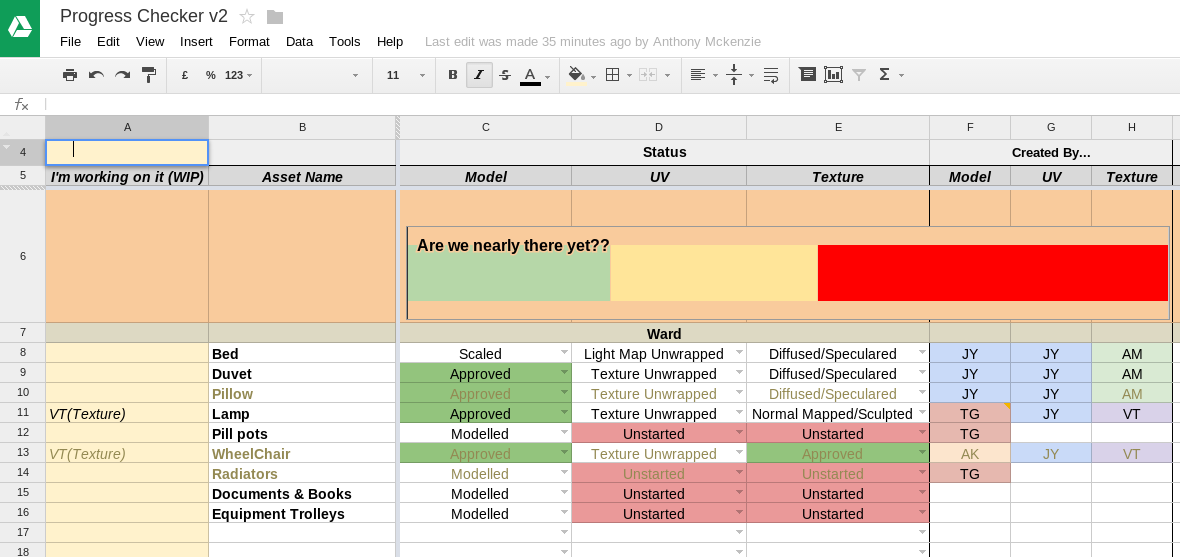
Previously I created a online spreadsheet to mark and manage progress we are making with the assets in our group project. It was done in the online excel app, simple but was lacking a few things. Meet the Progress Checker V2, done in Google Spreadsheet App which additionally allowed editing of: Comments, collaboration between team members. Wasn't able to do so in the online excel app although supported (WATDSITOEAAS) Freeze panes, viewing the headers of the table while whizzing around the vast list of assets, again WATDSITOEAAS Also added extra sections for marking who's done and doing what so we don't unnecessarily duplicate on work. A manual is also made so people are aware of the new changes. All this was done in 1 night.

Tidying up and UV unwrapping

Time to tidy up more models done by others then UV unwrap them, add collision box and scale it according to our scene. Spotted a couple of invisible/needless faces along the way, deleting them so UV unwrapping and texturing will go more smoothly. Going to try do as little modification as possible so I can do as much as I can in the limited time left.

More scripts! Move and rotate camera to face a face

Image
It's an impaled camera!! Sometimes when I UV, I really wished there is an option to move the camera so it is perpendicularly pointing at the face I'm unwrapping, while centred at the face's centre. This will help when UV planar project from the axis does not yield and fiddling around trying to get the camera perfect sucks. Unfortunately there don't seem to be there by default, so after a day of planning and scripting, here it is! Have to revert to A Level maths mechanics about the centre of mass of a lamina and a spreadsheet to plan and check the values before I started scripting, but it's done! All you have to do is: Select a face Edit 1 word of the script to the name of the camera you want to move Run the whole script Few flaws though: You will have to dolly out to view the face  The viewFit command (hotkey f) sometimes messes up the face centring I haven't got around to implementing something that translates the camera's loca...

Lightmapping in Maya

Image
Time for lightmapping the pesky meshes. The guides I'm going for are: 128 maps for the bigger environmental pieces 64 maps for the bigger props, maybe 128 in some 32 maps for the tiny props New set of UV for light map, copying from original texture UV then cutting them up more 2 to 3 pixel padding or spacing between each UV island, I'll go into more detail on how I do this automatically later If neighbouring faces is angled around 60 degrees or more, the UV edge between the faces will be split All islands fit in the UV space from 0 to 1 in U and V axis Video series I used by WorldofLevelDesign for light mapping principles, simple and short. He uses Maya too but I have my own twists on things  My personal, more intuitive setup for the UV grid for 64px lightmap resolution (right click on the UV grid icon) Mainly use edge selection in the UV to cut rather than rumbling about with the mesh trying to cut edges After all the islands are cut...

Little export scripts

Image
Been pumping up on my little exporting script and UI, think it is ready to be labelled version 1. It exports the meshes as OBJ or FBX, but pimped a bit more. Currently living in my custom shelf alongside the hot key assignment script for my custom ROCCAT Power Grid layout for Maya. Also occasionally using Charcoal Editor for writing scripts, more bulletproof colour labelling for codes and results, generally cool but it's a demo version so I don't have access to all the goodies. Now a little about the script: Red background, so it doesn't disappear into the dullness that is the normal Maya colour scheme Written for windows in mind, the file management and stuff. Could write more foe linux and mac but... got other work to do Also currently pretty picky with folder names and setup i.e. predefined FBX and OBJ folder names as suited to the ones on our current Dropbox folder Will refuse to do things if it is not in an environment it likes e.g. won't display folders...

Ah, new model, but...

Image
Got a new model from a team member yesterday, first model from him! Checked it out and looks good at first, nice details on the doors but then, under more scrutiny, I realised it might be unfinished as he did not state the situation on it. I sent him an email to check too, no replies as of yet. There is a mixture of highly detailed mesh, the door, alongside very primitive and simply composed meshes, e.g. doorknob and the pillars next to the doors. Also, it is massive compared to the scene that this asset will be in. If it is the finished asset, looks like I got a bit of work to do. Including UV unwrapping